
Tailwind CSSを使うたびに、
- text-xlって何pxだっけ?
- px-4って左右16pxだっけ?
- justify-betweenとitems-centerが毎回ごっちゃになる……
そういうことで、よく表記方法を検索しているのですが、自分で作ってみようと思ってこの記事を書きました。
必要最低限のものだけを厳選しているので、実務や学習中の確認用として使ってください!
このチートシートでまとめている内容
目次から探したい項目をクリックしてください!
Tailwind CSSとは?
Tailwind CSSは、HTMLに直接クラスを書いてデザインを作るユーティリティファーストCSSフレームワークです。
<button class="bg-blue-500 text-white px-4 py-2 rounded-lg">
  ボタン
</button>
CSSファイルを書かなくても、クラスを組み合わせるだけで画面を作れるのが特徴です。
Font Size(文字サイズ)
| クラス | CSS |
|---|---|
text-xs | font-size: 0.75rem (12px) |
text-sm | font-size: 0.875rem (14px) |
text-base | font-size: 1rem (16px) |
text-lg | font-size: 1.125rem (18px) |
text-xl | font-size: 1.25rem (20px) |
text-2xl | font-size: 1.5rem (24px) |
text-3xl | font-size: 1.875rem (30px) |
text-4xl | font-size: 2.25rem (36px) |
text-5xl | font-size: 3rem (48px) |
よく使うサイズ感
text-sm:補足説明text-base:本文text-lg:小見出しtext-2xl:見出しtext-4xl:ヒーローエリア
Font Weight(文字の太さ)
| クラス | CSS |
|---|---|
font-thin | font-weight: 100 |
font-light | font-weight: 300 |
font-normal | font-weight: 400 (標準) |
font-medium | font-weight: 500 |
font-semibold | font-weight: 600 |
font-bold | font-weight: 700 |
font-extrabold | font-weight: 800 |
font-black | font-weight: 900 |
実務でよく使うもの
font-normal
font-medium
font-semibold
font-bold
letter-spacing(文字幅)
| クラス名 | CSS | 説明 |
|---|---|---|
tracking-tighter | letter-spacing: -0.05em; | かなり詰める |
tracking-tight | letter-spacing: -0.025em; | 少し詰める |
tracking-normal | letter-spacing: 0em; | 標準 |
tracking-wide | letter-spacing: 0.025em; | 少し広げる |
tracking-wider | letter-spacing: 0.05em; | 広め |
tracking-widest | letter-spacing: 0.1em; | かなり広げる |
- 見出し →
tracking-wideやtracking-wider - 英語のロゴ風デザイン →
tracking-widest - 本文 → 基本的に
tracking-normalのままがおすすめ
line-height(行間)
| クラス名 | CSS | 説明 |
|---|---|---|
leading-none | line-height: 1; | 行間なし |
leading-tight | line-height: 1.25; | 狭め |
leading-snug | line-height: 1.375; | やや狭め |
leading-normal | line-height: 1.5; | 標準 |
leading-relaxed | line-height: 1.625; | ゆったり |
leading-loose | line-height: 2; | かなり広め |
- ブログ本文 →
leading-relaxed - 通常のテキスト →
leading-normal - 見出し →
leading-tight - 長文の記事 →
leading-relaxed〜leading-loose
特に日本語のブログでは、leading-relaxed を使うと文字が詰まりすぎず、スマホでも読みやすいレイアウトになります。
🌟 Spacing(余白)
Tailwindでは、Padding・Margin・Width・Heightなどで同じ数値体系を使います。
| 数値 | CSS |
|---|---|
0 | 0px |
0.5 | 0.125rem (2px) |
1 | 0.25rem (4px) |
1.5 | 0.375rem (6px) |
2 | 0.5rem (8px) |
2.5 | 0.625rem (10px) |
3 | 0.75rem (12px) |
4 | 1rem (16px) |
5 | 1.25rem (20px) |
6 | 1.5rem (24px) |
8 | 2rem (32px) |
10 | 2.5rem (40px) |
12 | 3rem (48px) |
16 | 4rem (64px) |
20 | 5rem (80px) |
24 | 6rem (96px) |
Padding(内側の余白)
| クラス | 方向 |
|---|---|
p-4 | 全方向 |
px-4 | 左右 |
py-4 | 上下 |
pt-4 | 上 |
pb-4 | 下 |
pl-4 | 左 |
pr-4 | 右 |
例
<div class="px-4 py-2">
左右16px、上下8pxになります。
Margin(外側の余白)
| クラス | 方向 |
|---|---|
m-4 | 全方向 |
mx-4 | 左右 |
my-4 | 上下 |
mt-4 | 上 |
mb-4 | 下 |
ml-4 | 左 |
mr-4 | 右 |
mx-auto | 中央寄せ |
-mt-4 | マイナスマージン |
よく使う例
class="mx-auto max-w-4xl"
コンテンツ中央寄せの定番です。
他の余白の書き方
「calc(var(–spacing) * 6)」のような「--spacing 」を使う方法もあります。
下記記事にまとめているのでご参照ください!
Flexbox
基本
| クラス | CSS |
|---|---|
flex | display: flex |
inline-flex | display: inline-flex |
flex-row | 横並び |
flex-col | 縦並び |
flex-wrap | 折り返し |
flex-nowrap | 折り返さない |
flex-1 | 残り領域を埋める |
flex-auto | 自動伸縮 |
flex-none | 固定 |
grow | 拡大する |
grow-0 | 拡大しない |
shrink | 縮小する |
shrink-0 | 縮小しない |
justify / items
覚え方
justify-*→ 横方向items-*→ 縦方向
| クラス | 説明 |
|---|---|
justify-start | 左寄せ |
justify-center | 中央 |
justify-end | 右寄せ |
justify-between | 両端配置 |
justify-around | 均等配置 |
items-start | 上揃え |
items-center | 中央揃え |
items-end | 下揃え |
items-baseline | ベースライン |
items-stretch | 伸ばす |
Gap(要素間の余白)
| クラス | CSS |
|---|---|
gap-1 | 4px |
gap-2 | 8px |
gap-4 | 16px |
gap-x-4 | 横16px |
gap-y-4 | 縦16px |
Width & Height
| クラス | CSS |
|---|---|
w-full | 100% |
w-screen | 100vw |
w-auto | auto |
w-1/2 | 50% |
w-1/3 | 33.333% |
w-2/3 | 66.667% |
w-1/4 | 25% |
h-full | 100% |
h-screen | 100vh |
h-auto | auto |
min-h-screen | 最小高さ100vh |
数値も使える
w-4  → width: 1rem
h-10 → height: 2.5rem
Spacingと同じルールです。
Display
| クラス | CSS |
|---|---|
block | block |
inline-block | inline-block |
inline | inline |
hidden | none |
grid | grid |
Position
| クラス | CSS |
|---|---|
relative | relative |
absolute | absolute |
fixed | fixed |
sticky | sticky |
top-0 | top: 0 |
right-0 | right: 0 |
bottom-0 | bottom: 0 |
left-0 | left: 0 |
inset-0 | 四方向0 |
Border & Rounded
| クラス | CSS |
|---|---|
border | 1px |
border-2 | 2px |
border-t | 上だけ |
rounded | 4px |
rounded-md | 6px |
rounded-lg | 8px |
rounded-xl | 12px |
rounded-full | 円形 |
Text
| クラス | CSS |
|---|---|
text-left | 左寄せ |
text-center | 中央 |
text-right | 右寄せ |
text-white | 白 |
text-black | 黒 |
text-gray-500 | グレー |
text-red-500 | 赤 |
underline | 下線 |
line-through | 打ち消し線 |
truncate | 1行省略 |
whitespace-nowrap | 改行禁止 |
leading-tight | 行間狭め |
leading-normal | 標準 |
Background
| クラス | CSS |
|---|---|
bg-white | 白 |
bg-black | 黒 |
bg-gray-100 | 薄いグレー |
bg-transparent | 透明 |
色の書き方
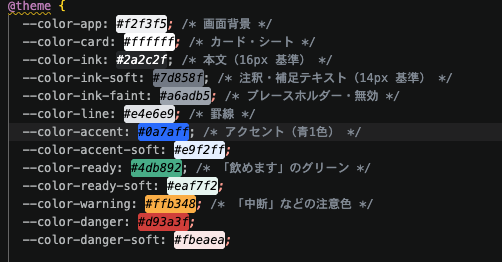
@theme で自分の色・余白を定義する側の書き方もあります。
AIでファイルを作成してもらうときに使用する可能性が高いので併せてご参照ください!!!
Shadow & Opacity
| クラス | CSS |
|---|---|
shadow | 小 |
shadow-md | 中 |
shadow-lg | 大 |
shadow-none | なし |
opacity-50 | 50% |
opacity-0 | 非表示 |
opacity-100 | 100% |
レスポンシブ(ブレークポイント)
| プレフィックス | 最小幅 |
|---|---|
sm: | 640px以上 |
md: | 768px以上 |
lg: | 1024px以上 |
xl: | 1280px以上 |
2xl: | 1536px以上 |
使用例
class="text-base sm:text-lg md:text-xl"
- スマホ:16px
- 640px以上:18px
- 768px以上:20px
よく使う組み合わせ
<!-- 中央寄せ -->
<div class="flex items-center justify-center">

<!-- 横並び -->
<div class="flex items-center gap-2">

<!-- 左右に分ける -->
<div class="flex items-center justify-between">

<!-- 縦並び -->
<div class="flex flex-col gap-4">

<!-- カード -->
<div class="rounded-lg shadow-md p-4 bg-white">

<!-- テキスト省略 -->
<p class="truncate w-full">

<!-- レスポンシブ2カラム -->
<div class="grid grid-cols-1 md:grid-cols-2 gap-4">
任意の値(Arbitrary Values)
用意されていない値を使いたい場合は [] を使います。
<div class="text-[1.2rem]">
<div class="p-[0.2em]">
<div class="mt-[10px]">
<div class="w-[200px]">
<div class="text-[#ff6600]">
覚え方
「Tailwindにないなら [] で書く」
これだけ覚えておけば困ることは少ないです。
個人的によく使うベスト10
flex
items-center
justify-between
gap-4
p-4
rounded-lg
shadow-md
w-full
text-gray-500
md:grid-cols-2
応用編
Tailwindを使ってコードを書いていたら、困った点がいくつかあったので記事にしました。
同じような悩みを抱えている人いると思うので参考になれば嬉しいです。
Tailwind を使ったアプリ開発ログ

Tailwind v4の余白がわからない!mb-6の中身「calc(var(–spacing) * 6)」を調べた話
Tailwindの色「–color-ink-soft」って何色?VScodeの拡張機能「Color Highlight」が便利!
Tailwind CSS|–color-〇〇 の「〇〇」がそのままクラス名になる
Tailwindの hover: や md: って何?状態プレフィックスのしくみを調べた
私みたいなやつは、正直CSSの方が書きやすいと思いますが、これを使えるようになるとファイルが減るので便利だなと思いました。
みなさんもぜひ活用してみてください!